
Read the status
Check Last update and Next reset before comparing the route. A timestamp gives context to every marker you are about to use.
Scroll to zoom. Drag the map to move. Select a marker for the item name and icon.
 Loading live mapFetching today's terrain and markers…
CURRENT ROTATION
The daily map is most useful before the party leaves the safe route. Check the current rotation, isolate the marker tied to the run, and make a detour decision while the terrain is still easy to compare.
TODAY’S ROTATION
Daily map searches usually begin with one urgent question: what does this run look like right now? Start with the active level and current timestamp, then use the map to prepare the next move rather than cataloging every point on the screen.
A useful briefing names three things: the required direction, the optional target, and the landmark that connects them. This makes the map readable for the whole party. One player can call the route, another can watch the layer panel, and a third can verify the terrain in the game. The map supports that conversation because the marker, image, and update status remain visible together.
Daily rotation data changes the value of a marker. An item that was a short walk yesterday may sit behind a difficult contour today. Read the current image first, then decide whether a location deserves attention. If the update is close to the next reset, keep a flexible plan and avoid treating a single pin as a guarantee.
The daily map also helps when the group is deciding what to ignore. A visible point is an invitation to inspect the route, not an instruction to leave it. Keep the mandatory climb in view, compare the target with the next safe landmark, and let the route decide how much detail is useful. That keeps today’s map practical during a live session instead of turning it into a static list of possible errands.
For a fresh session, give the map a deliberate first pass. Confirm the level, read the timer, select the one category that matches the objective, and then compare the marker with the route edge. This order prevents an old screenshot, a hidden layer, or a wrong biome from shaping the first call. It also gives new players a clear way to participate: they can verify the landmark while another player manages the filter.
RUN PREPARATION
A short preparation sequence prevents most map-reading mistakes and keeps the live tool useful on a small screen.
Check Last update and Next reset before comparing the route. A timestamp gives context to every marker you are about to use.
Move to the biome the group is entering. Do not infer a marker’s level from its position in a thumbnail or from a previous run.
Choose one category or luggage subtype. A focused layer turns the daily map from a crowded picture into a route question.
ROUTE VALUE
The right question is rarely “Where is the marker?” It is “What does reaching the marker cost compared with the benefit?”
Start by comparing lateral distance. A target beside the required route can be worth checking even when it is optional. A target beyond a ridge needs stronger evidence because the group may spend stamina on the approach and the return. Look for a second landmark that confirms the direction. If the route back to the climb is hard to describe from the image, pause before making it the next objective.
The daily map becomes more reliable when the group agrees on a stop condition. Stop if the visual landmark does not match the game, if a drop removes the return route, or if the party has to choose between the reward and the required climb. A skipped marker is a successful decision when it protects the run.
MARKER DISCIPLINE
Each category is useful in a different planning moment. Mixing every category together creates the visual noise that makes a daily map feel unreliable.
Keep Luggage visible and open a subtype filter when the party wants one item. Compare the target with the route rather than selecting the first nearby pin.
Use Belltowers or Tombs when the team needs a recognizable structure to orient itself. These markers become stronger when paired with terrain.
Use Animals or Amulets for a specific side goal. Hide the other layers so the optional objective does not bury the required route.
VISUAL ROUTE READ
The current map image gives the party a shared visual language. Use it to point out edges, ridges, and open approaches instead of reading a coordinate in isolation.
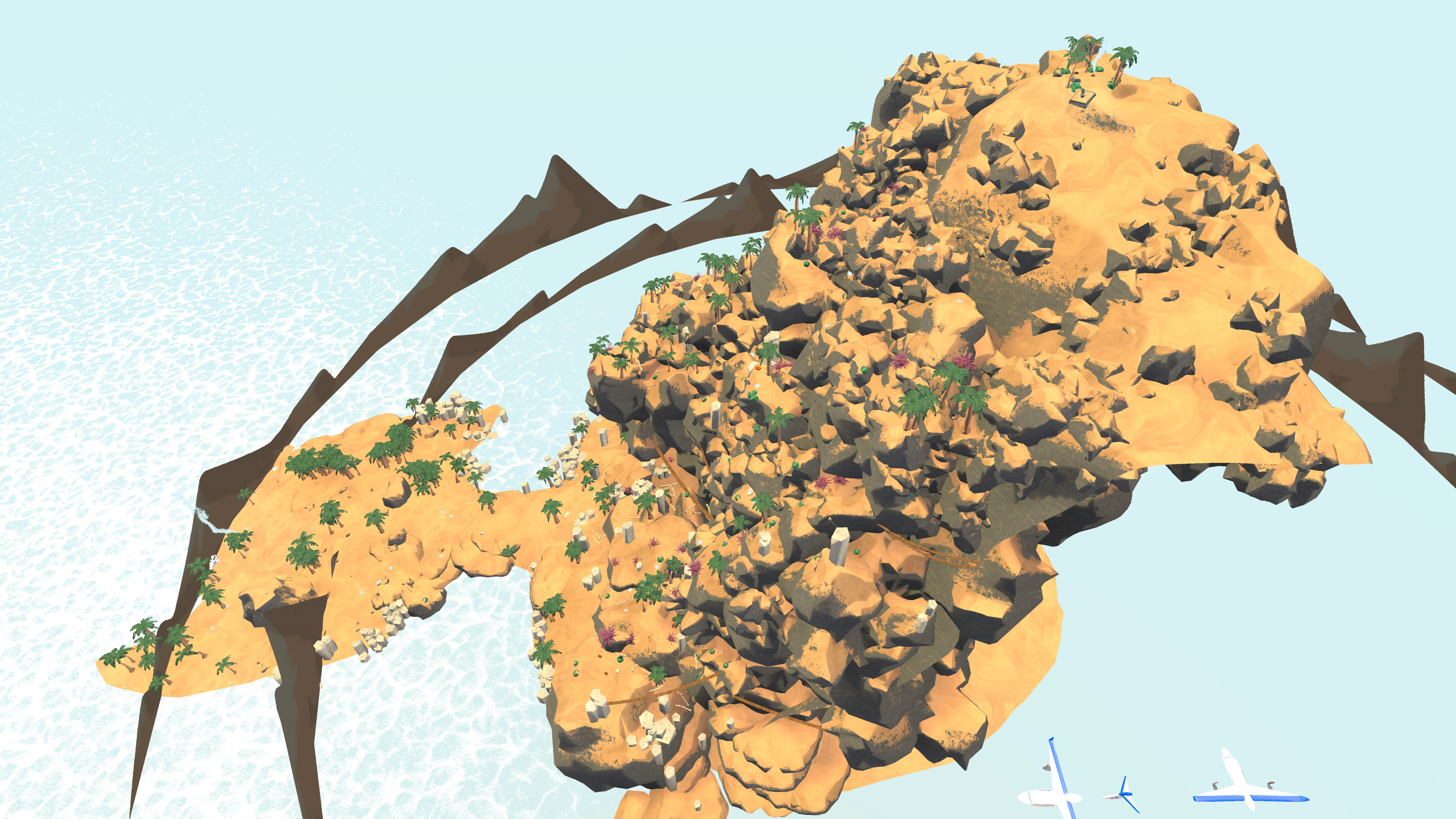
Use a side view when an early-level slope or contour changes the meaning of a marker.
Top view is usually the fastest way to decide which side of the route contains an objective. A side view can add context when a pin sits near a rise, drop, or layered rock shape. Switch views with a specific question in mind; changing the angle repeatedly without a decision adds time without adding confidence.
When the image and the game disagree, compare the nearest large shape first. Small pins are easy to misread at distance. Large terrain boundaries, coastlines, and structures are better anchors for a live call.
RESET WINDOW
A daily map has a useful shelf life. The reset clock tells you when to recheck rather than allowing an old route to become false certainty.
The displayed countdown is especially useful when a group is planning a later session. If the run begins before the reset and ends after it, decide which part of the map needs verification. If the session starts near 17:00 UTC, open the tool again after the rotation settles. The update time is a reference for the map package; it should not be mistaken for a live connection to your game world.
This habit also explains why a marker may look absent. Check the layer, biome, angle, and update time in that order. Only after those checks should you conclude that the current snapshot has no point for the category.
A daily map is most valuable when it shortens the conversation before movement. Instead of asking everyone to search the same image, assign a small task: one player confirms the level, one selects the layer, and one compares the nearest terrain shape. The group gets a route call quickly and can return to the climb with less screen time.
Before moving, name one target and one fallback. Keep a nearby landmark ready if access fails, leave low-value pins for another rotation, and hand the next player the level, filter, target, and return landmark in one sentence. This keeps the daily map focused on the current climb even when the page contains more locations than the party needs. If the route changes after a reset, repeat the same brief rather than relying on yesterday’s memory.
QUICK ANSWERS
Short answers for the decisions that affect today's route, markers, and detours.
Open the live map, compare Last update with the reset countdown, and choose the biome your party is entering before filtering markers.
The daily reset is tracked at 17:00 UTC. Recheck the map after the rotation if your session starts close to that boundary.
No. Use the route, nearby terrain, and return path to decide which optional marker earns a detour.
The map is a community-data snapshot. Confirm the active rotation, biome, view, and terrain in the current game.
Yes. Turn layers on or off and narrow Luggage to a subtype when the run has a specific collection goal.