
Choose the level
Use the biome controls to open the level that matches the next part of the climb. A marker on another level cannot answer the decision in front of the party.
Scroll to zoom. Drag the map to move. Select a marker for the item name and icon.
 Loading live mapFetching today's terrain and markers…
DAILY ROUTE DESK
Open the live map, choose the biome your party is climbing, and reduce the screen to the marker that matters. Peak Map Today helps you decide whether a Tomb, animal, item, or optional reward sits on the way or asks for a costly detour.
START WITH THE CURRENT RUN
A map is useful when it answers the next decision quickly. Before moving, check the active biome, the update time, and the visible terrain. That short check gives the group a shared reference instead of a vague direction such as “somewhere on the left side.”
The live map keeps the route and its optional locations in one workspace. You can switch between the available biomes, change the view where the data supports it, and leave the map open while the party discusses a target. This matters in PEAK because the shortest-looking path is not always the safest one. A marker may be close in straight-line distance while sitting beyond a ridge, below a difficult drop, or behind a route that costs more stamina than the reward is worth.
Use the map as a planning instrument, not as a promise that every approach will be open. Select a marker for its name and icon, zoom until the surrounding shape is recognizable, and keep one fallback landmark in mind. When the terrain in the game disagrees with the snapshot, trust the live game and treat the map as a narrowing tool.
Players usually need the answer in a few seconds: which level is active, what is worth checking, and where can the group rejoin the climb? Keep those questions in that order. The map is easier to trust when it gives the party a small, repeatable decision instead of a wall of unexplained pins. A clean route call also makes the tool useful for players who are joining mid-run and have not seen the earlier terrain.
If you are checking the map between attempts, begin with the full image rather than the last place you remember. Daily routes can change the relationship between a marker and the mandatory climb. A quick reset to the broad view makes old assumptions visible, especially when a familiar icon now sits on the far side of a ridge or at the end of a different approach.
A SIMPLE READING LOOP
The fastest route decisions follow the same order every time: locate the correct level, remove unrelated pins, and confirm the approach with terrain.
Use the biome controls to open the level that matches the next part of the climb. A marker on another level cannot answer the decision in front of the party.
Show Tombs, Animals, Luggage, Amulets, or Belltowers according to the objective. Fewer icons make the useful shape easier to match in the game.
Before taking an optional path, identify the ridge, edge, or structure that brings the group back to the required climb.
WHAT THE MAP CAN SHOW
The layer panel is a decision filter. It is faster to turn categories off than to search through every icon on a busy route.
Use Luggage when the run has a specific collection goal. Open its subtype filter when a general supply marker is too broad, then compare the item with the mandatory path rather than chasing every crate.
Animals are useful for a quick location check when the party wants a creature marker. Pair the pin with a visible terrain feature, then decide whether the approach leaves enough room for the climb.
These layers answer different questions: can the entrance be reached, is an optional reward nearby, or does a recognizable structure help with orientation? Keep them separate while planning.
TERRAIN RECOGNITION
A single pin is rarely enough for a difficult detour. The surrounding visual pattern gives the marker context that a coordinate alone cannot provide.
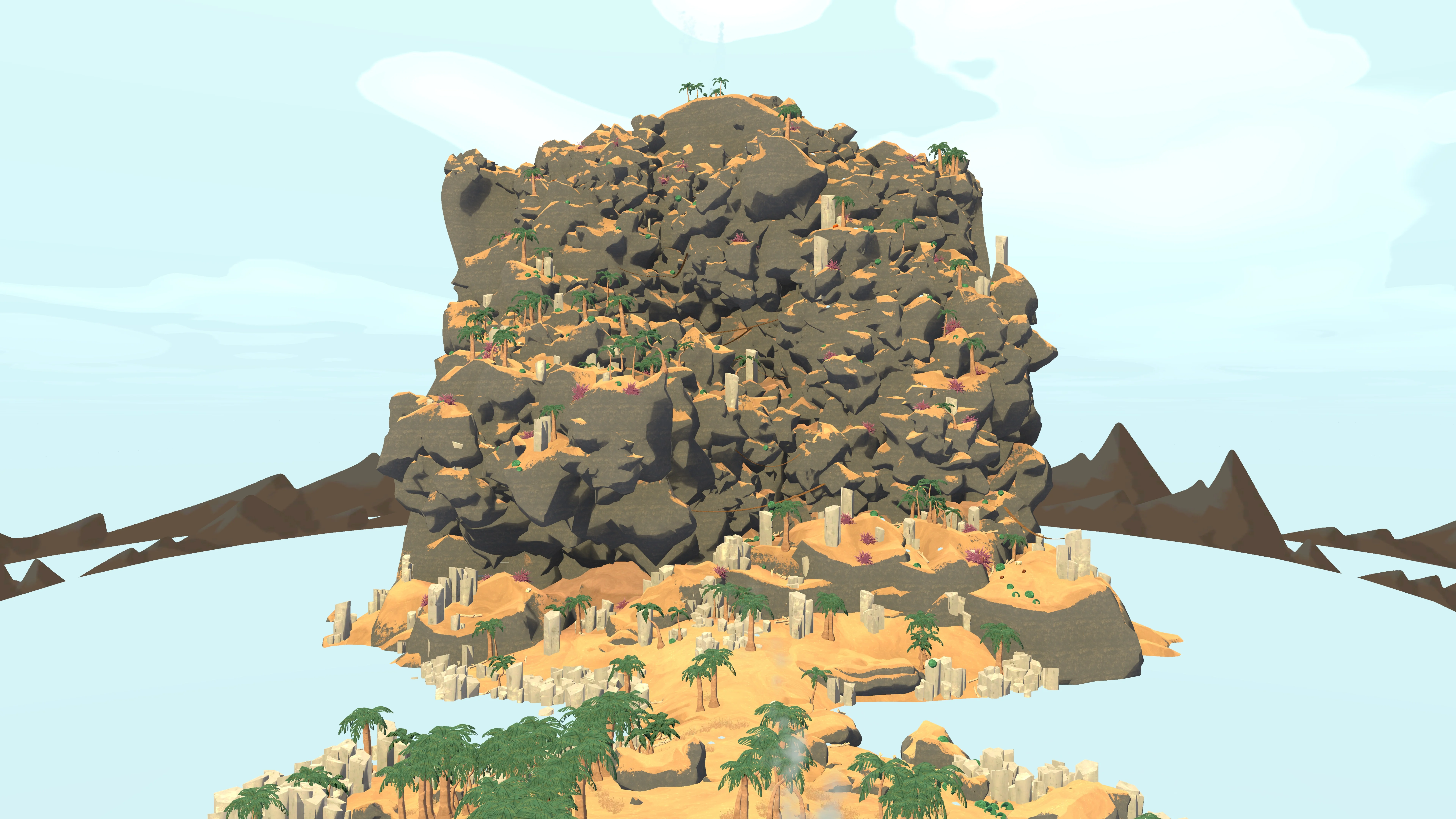
Use the Shore terrain as a broad reference before following an optional marker.
Look for a pair: the target marker plus a ridge, shoreline edge, tall structure, bend, or change in ground color. When both appear in the game, the group can move with more confidence and recover if the first approach is blocked. The same habit works across the map because it relies on recognition instead of a fragile screen position.
Zoom in only after the broad route is understood. At full view, the map answers “which side of the climb?” At a closer level, it answers “which contour should we check first?” Keep those questions separate so a detailed screenshot does not hide the route decision.
DETOUR CONTROL
The map cannot measure your group’s stamina or hazards, but it can expose the shape of a detour before the party commits.
First ask whether the marker lies beside the route or beyond it. A side objective that shares the next safe landmark is usually easier to evaluate than one that pulls the group across an unfamiliar slope. Next ask whether the return path is visible. If the map shows a one-way-looking descent, an obscured ridge, or a long blank section between the objective and the climb, make the stop condition explicit before leaving the route.
This approach keeps the map useful even when the answer is “skip it.” A good route guide does not send every group toward every collectible. It gives enough context to choose the target that fits the current run, the current biome, and the group’s margin for recovery. Reopen the map after the daily reset because the same reward can sit in a different relationship to the route.
The same rule applies to a marker that looks close at maximum zoom. Distance on the image does not include climbing, turning, searching, or recovering from a wrong descent. Use the map to expose those questions before the party moves. When the route is clear, zoom in for the final approach; when the route is uncertain, keep the broad view and preserve an exit.
MAP FRESHNESS
A missing marker can mean a filter is off, the wrong biome is open, or the snapshot belongs to an earlier rotation. The timestamp helps separate those cases.
Use the displayed update time as the age of the community snapshot. It tells you how recently the map data was packaged, not whether your game session has already changed.
The countdown points to the next daily cycle at 17:00 UTC. If the rotation is close, plan conservatively and recheck before starting a long detour.
The final source of truth is the current game. Match the pin with terrain, hazards, and access before treating a location as reachable.
Once the target is understood, close the marker detail and return attention to the climb. The best map check ends with a clear callout the whole party can follow.
QUICK ANSWERS
Short answers for the decisions that affect today's route, markers, and detours.
The daily cycle is tracked against 17:00 UTC. Check the update timestamp and countdown beside the live map before planning around a rotation.
Yes. The map keeps the main canvas available on mobile, with layer filters and biome controls below it. Tap a marker to inspect its name and icon.
Showing only the category tied to your current objective removes visual noise and makes the terrain around the useful marker easier to recognize.
Peak Map Today is an independent community guide. Use the map to narrow a location, then confirm hazards and the final approach in the game.
Use the zoom controls or wheel over the map. After zooming in, drag to inspect a ridge, structure, or route edge; reset returns to the full view.