
Filter Animals
Hide item, Tomb, amulet, and landmark layers. A quieter map makes the capybara marker and its terrain context easier to see.
Scroll to zoom. Drag the map to move. Select a marker for the item name and icon.
 Loading live mapFetching today's terrain and markers…
ANIMAL FINDER
A capybara search should take one clear pass: open Animals, confirm the biome, select the marker, and use the surrounding terrain to decide where the party should look first.
ANIMAL SEARCH
Animal searches become slow when the player scans a full map packed with luggage, Tombs, amulets, and structures. The live map lets you reduce the view to the category that matters.
Start with the Animals layer and the current biome. The marker tells you where the community snapshot places the animal, but the nearby terrain tells you how to reach the search area. Look for a broad edge, rock formation, route bend, or color boundary that can be called out to the group. That reference is more useful than trying to remember the exact pixel position of a small icon.
A capybara objective can be optional, so keep route value in view. If the marker sits next to the next required landmark, the search may fit naturally into the climb. If it requires a long sideways move and the return route is unclear, decide whether the reward justifies the time. Finding a location and choosing to visit it are separate decisions.
The animal marker is easiest to use when the party has one search area, one nearby landmark, and one exit direction. That simple frame prevents the common mistake of circling a large level while every player calls out a different possibility. Use the map to narrow the first look, then let the current game view determine whether the search continues.
The best capybara callout is short enough to repeat while moving. Mention the biome, the nearby shape, and the direction from the route. If the animal is not found at the first landmark, move to the next bounded area rather than expanding the search without limit. A bounded search protects the rest of the run and keeps the location useful for another attempt.
When the animal is the main reason for opening the page, resist the urge to leave the map for a long guide. Keep the tool visible, turn off unrelated categories, and use the marker preview only long enough to confirm the target. The surrounding image does the rest: it gives the party a first search zone and a route back if the animal is not immediately visible.
FAST FINDER LOOP
Use a repeatable sequence so the animal marker stays connected to the route instead of becoming a separate scavenger hunt.
Hide item, Tomb, amulet, and landmark layers. A quieter map makes the capybara marker and its terrain context easier to see.
Use the biome selector before acting on the pin. The same screen position can mean a different route on another level.
Zoom around the marker, choose a recognizable landmark, and decide where the group returns to the main climb.
READ THE SURROUNDINGS
The strongest location call can be spoken without the map: “look past the shelf,” “check below the bend,” or “search beside the next structure.”
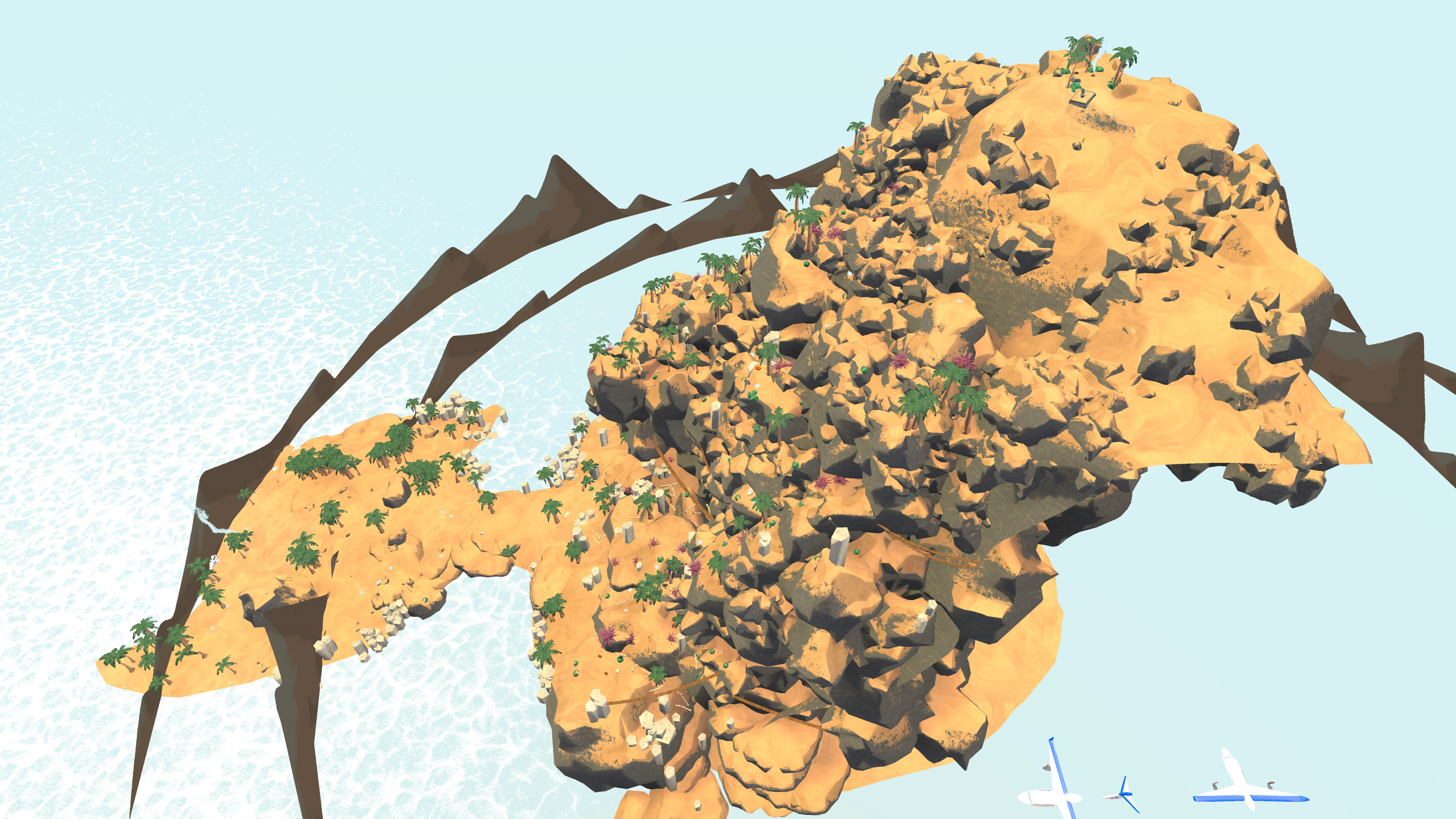
Use a side view when elevation changes make the animal marker hard to place from above.
Use the top-down image to understand direction and distance. Change to a side view when a slope, ridge, or drop makes the search area ambiguous and the data provides another angle. The goal is not to inspect every pixel. It is to choose the first place the party should look after leaving the required route.
A terrain sentence also helps when the marker is not visible in the game immediately. The animal may be behind a rock shape or around a small bend. A large landmark keeps the search bounded while the group checks the area rather than wandering across the entire level.
On a wide map, the marker’s exact icon can be less useful than its relationship to the nearest route feature. Read the distance to that feature, decide which side to inspect first, and keep the required climb visible at the edge of the map. This gives the party an orientation check even when the animal moves or the first search angle is inconvenient.
If the search turns into a long sweep, reset the map and ask a narrower question. Is the marker on the route side of the ridge? Is the nearby structure above or below the path? Is the first search area still inside the current biome? Specific questions keep a capybara location page useful under pressure and stop a small objective from consuming the whole run.
ROUTE VALUE
The map can locate the search area; the party decides whether the objective fits the current climb.
Estimate the cost in three parts: distance away from the route, difficulty of the approach, and clarity of the return. A short walk across an open shelf is easy to evaluate. A marker below a confusing ridge demands more caution because the group may spend time finding the animal and then more time recovering the route. Use the live terrain rather than the reward label alone.
If the group is already close to a safe landmark, the capybara search can become a useful break in the climb. If the route is under pressure, save the location for another rotation. A focused animal finder should help the team make that decision quickly and keep moving when the answer is no.
MARKER TROUBLESHOOTING
A missing animal point is usually a map-state question before it is a location question.
Check the checkbox in Map layers. The category count and visible pins should agree after the layer is enabled.
Use Previous or Next biome to return to the level your run is entering. A marker is tied to the active map data.
Read Last update and the reset countdown. Reload after a new rotation if the terrain or marker set has changed.
Close the selected-point detail or reset the map when the preview hides the surrounding terrain. The animal location needs context to be useful.
SEARCH WITHOUT NOISE
The useful map view balances detail with orientation. Zoom enough to recognize the approach, then keep a little of the required route in frame.
A close crop can make a marker look precise while hiding the direction the party must travel. Start wide enough to see the route boundary, then zoom one step at a time. After each change, ask whether the surrounding shape is more recognizable. If the answer is no, reset and return to the broader view.
On mobile, layer controls sit with the map workflow so the player can filter without leaving the page. Select the marker for its name and icon, then close the inspector when it covers the route. The goal is a short search loop that leaves the main climb understandable.
If the marker is still uncertain, use the top-down view to choose direction and the side view to check height. Do not keep changing views without a question. One view should tell you where to start looking; the other should tell you whether the approach is above, below, or beside the route.
QUICK ANSWERS
Short answers for the decisions that affect today's route, markers, and detours.
Turn on Animals, choose the active biome, select the capybara marker, and use the nearby terrain to choose the first search area.
Check Animals, the selected biome, the current map angle, and the snapshot timestamp before assuming the location is unavailable.
No. Hide unrelated categories so the animal marker and its surrounding terrain are easier to recognize.
Yes. Use the map canvas first, then open the layer controls below it, select the animal marker, and zoom with the controls.
No. Compare the distance, approach, and return route with the group’s current margin before leaving the required climb.